
Document Templates for Electronic Signatures: Reusable, Multi-Signer Templates for Faster Document Sending
Create once. Send forever.
Many small businesses and independent professionals rely on the same documents every day: agreements, authorizations, consents, onboarding forms, and approvals.
With HippoSign Document Templates, you only have to set them up once.
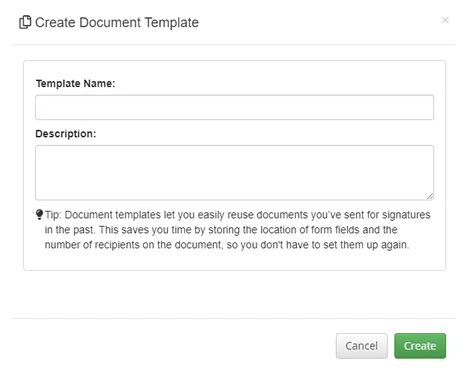
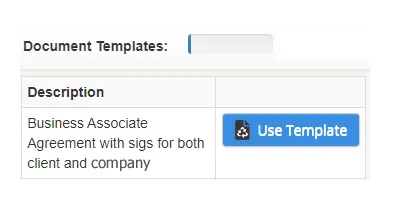
Create a document, place signature fields for one or more participants, save it as a template, and reuse it anytime. When you’re ready to send, select the template, enter the recipient emails, and send securely in seconds.
No re-uploading. No reconfiguring. No repetitive setup.
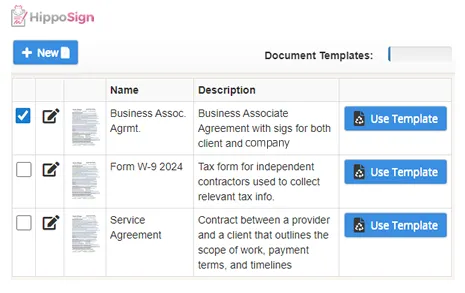
Create Once. Reuse Again and Again.
If you’re setting up the same forms again and again, you’re wasting time and increasing the chance of mistakes.
With Document Templates, you can:
- Upload or create a document once
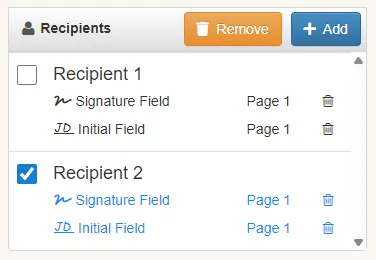
- Define one or multiple signing parties
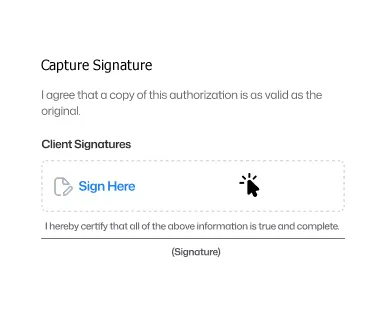
- Place signature blocks, initials, dates, and text fields exactly where needed
- Save the document as a reusable template
Every send starts from a ready-to-go document, configured exactly the way you want.
Built for Multi-Party Signing
Many documents require more than one signature. HippoSign templates support multi-party signing, making it easy to collect signatures from everyone involved, without creating multiple versions of the same document.
Templates can include:
- Client and provider signatures
- Business owner and customer signatures
- Parent or guardian signatures
- Financial guarantors or co-signers
- Internal staff or witness acknowledgements
Each signer’s fields are clearly defined and assigned so the right person signs in the right place, every time.
Send in Seconds, Even with Multiple Signers
Once your template is saved, sending a document takes just a few clicks.
- Select your template
- Enter the email address for each signer
- Send securely
HippoSign handles the signing flow so each participant completes only their assigned fields, on any device.
Consistent, Professional, and Error-Free
Templates ensure every document is:
- Complete and consistent
- Sent with all required signers included
- Free from missing or misplaced signature fields
- Professional and easy for recipients to sign
Once it’s set up correctly, it works the same way every time.
Secure by Design
All documents sent using HippoSign templates are protected by built-in security features.
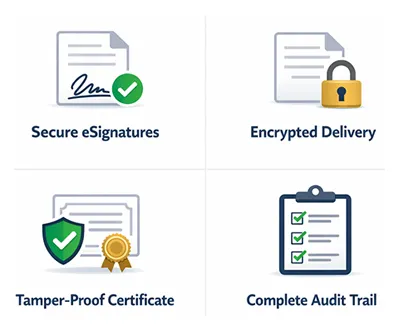
- Secure electronic signatures
- Encrypted document delivery
- Tamper-proof digital certificate applied once all parties have signed
- Complete audit trails for every signer
For healthcare providers, HippoSign also supports HIPAA-compliant workflows, making it easy to use the same platform across regulated and non-regulated documents.
Built for Small Businesses, Not Enterprise Complexity
Many e-signature platforms reserve advanced features like templates and multi-party workflows for expensive enterprise plans. HippoSign makes them accessible to small and solo operators.
You get:
- Reusable document templates
- Multi-party signing support
- Simple setup and intuitive workflows
- Affordable, predictable pricing
No unnecessary features. No bloated costs.
Spend Less Time on Paperwork.
Get Every Signature, The First Time.
Document Templates help you move faster, reduce errors, and create a smoother signing experience for everyone involved.
- Create it once.
- Reuse it anytime.
- Send with confidence.


Explore More Features
Discover additional tools that enhance your workflow and help you get more done with HippoSign.

Frequently asked questions
Up to 25 parties can sign one document.
No, recipients do not need to register for an account. They are simply asked to verify their email address upon signing with a one time code.
Absolutely. HippoSign is mobile-friendly and works on any smartphone, tablet, or computer via the HippoSign web portal. No app installation required.
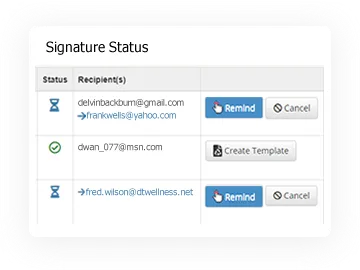
Signed documents are stored securely in your HippoSign dashboard, with alerts sent via email.
HippoSign uses the PDF standard for maximum compatibility and security. If you have a document in another format such as Word, simply open the document and choose Print to PDF. This will generate a PDF file which can be used with HippoSign.
Simply click the Get Started button. Then sign up and start signing!
No. HippoSign is a fully cloud-based, browser-only electronic signature platform that does not require any software downloads, mobile apps, browser extensions, or plugins for either senders or signers. Everything runs securely online and works in any modern web browser on desktop computers, laptops, tablets, and mobile phones. Documents open instantly in the browser and can be reviewed and signed right away, with no installation, setup, or extra steps required.
Yes. HippoSign is designed for HIPAA-compliant document workflows and includes security controls appropriate for healthcare organizations.
Yes. HippoSign is designed for small businesses that need electronic signatures without the cost and complexity of enterprise e-signature platforms. It makes it easy to send, sign, and track documents online while providing business-ready features such as reusable templates, PDF editing, automated reminders, audit trails, signer verification, secure document storage, multi-party signing, and tamper-proof digital certification.
When choosing electronic signature software, small businesses should consider more than price alone. Ease of use, security, document management, signing limits, and included features can significantly affect the overall value of a platform.
To make the comparison easier, see our Best Electronic Signature Software for Small Businesses (2026 Comparison Guide), where we compare HippoSign with 9 other leading e-signature platforms across features, ease of use, security, compliance, and pricing.